
Rotoscoping is one of the most common tasks on a VFX shot list, and one of the most underestimated. It looks simple — draw around a person — but the difference between a matte that works and one that causes problems downstream comes down to edges, motion and consistency across hundreds of frames.
This guide is for producers, coordinators and supervisors who need to scope, brief and review roto work. It covers where the technique came from, what modern roto actually delivers, which shots are hard and why, and what a supervisor checks before approving a matte.
A short history of rotoscoping
The word comes from the rotoscope, a device the animator Max Fleischer developed in 1915. It projected live-action film, one frame at a time, onto a glass panel so an animator could trace the movement. Fleischer used it for his Out of the Inkwell series, and the technique was later used by many animation studios to give drawn characters realistic motion.
Visual effects borrowed the idea. Before digital compositing, artists hand-painted mattes on cels or film frames to separate elements for optical printing. Today the tracing happens in compositing and roto software, with animated vector shapes instead of ink, but the principle is the same: an artist defines, frame by frame, exactly where a subject ends and the background begins.
What rotoscoping is in modern VFX
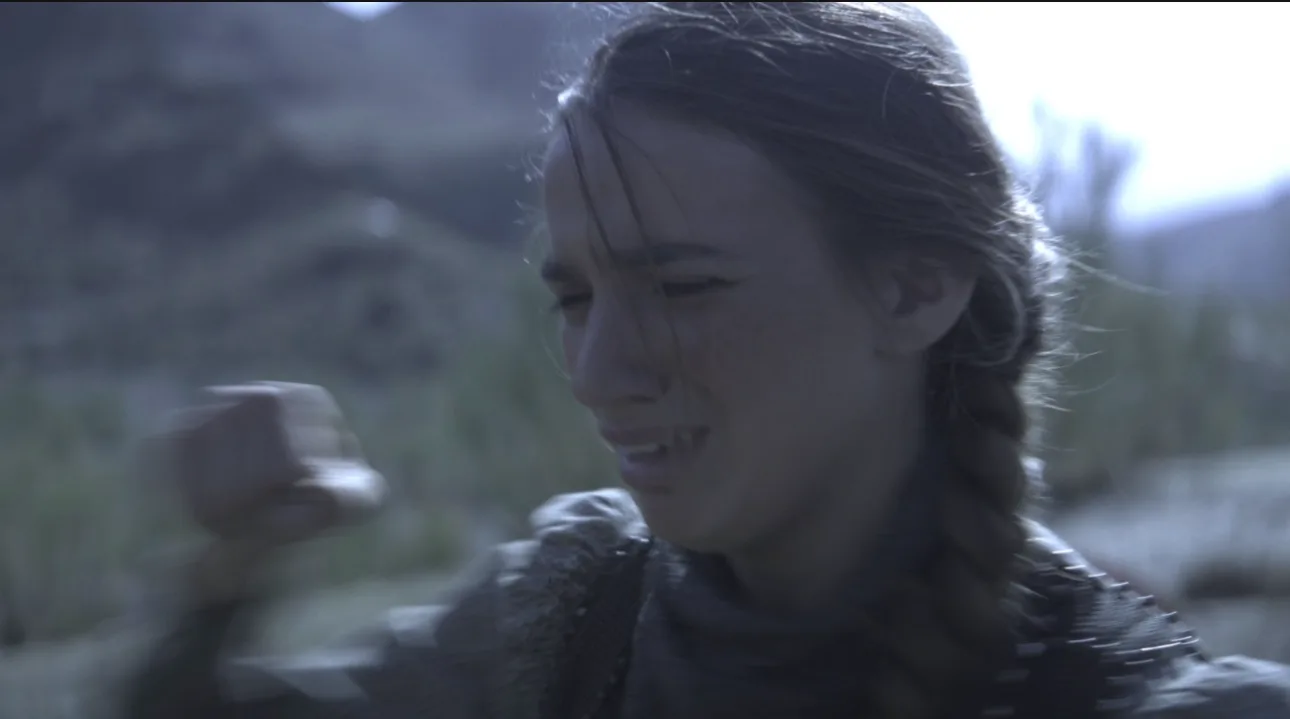
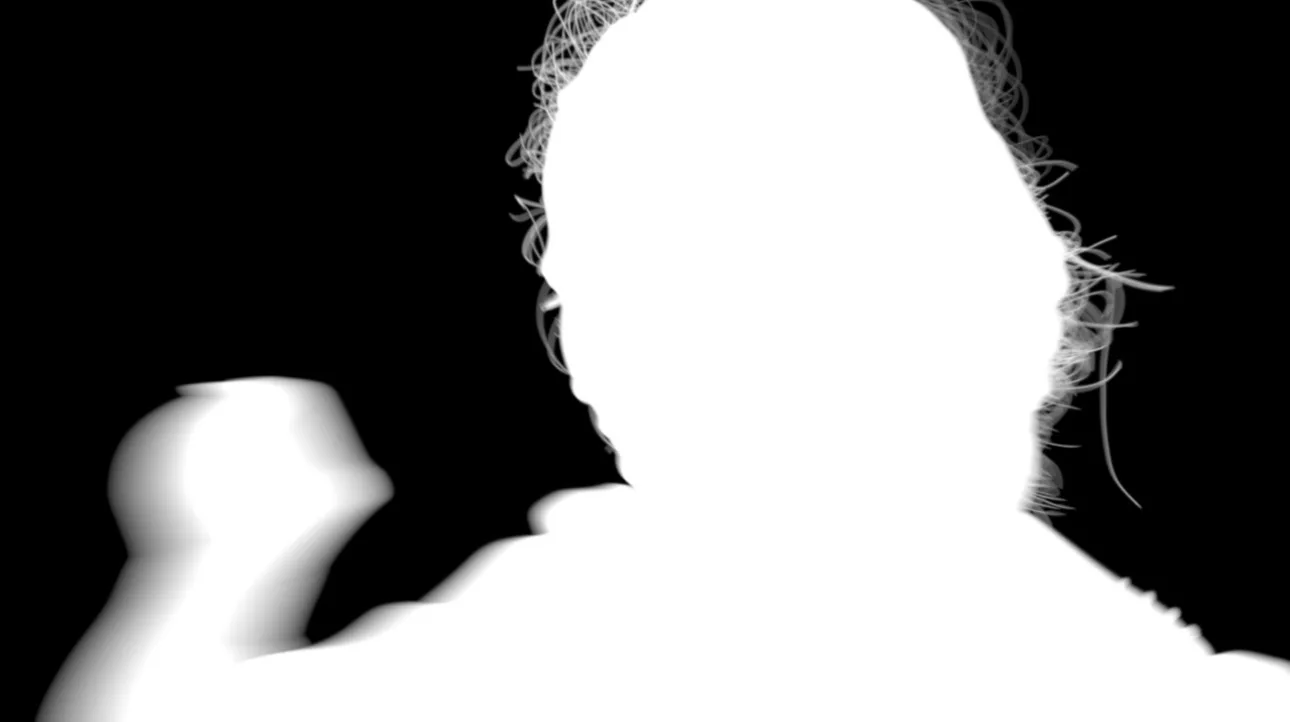
In a VFX pipeline, rotoscoping means creating a matte — a greyscale image where white is the subject, black is everything else and grey is partial transparency — by drawing and animating shapes around the subject over the length of a shot.
An experienced roto artist rarely draws one outline around a whole person. They break the subject into many simple shapes: the head, the neck, each section of each limb, the hands, the hair. Each shape is animated with its own movement, which keeps the outline stable and makes it easier to adjust one area without disturbing the rest. Shapes are given feathered edges where the subject is soft, and are animated to follow motion blur where the subject is moving.
Roto is needed whenever a subject has to be separated from its background and the footage can’t do it automatically — there was no green screen, the screen didn’t cover the action, or the subject has to be isolated from other objects in the frame.
What roto delivers
The output of roto is a matte, but the form it takes depends on what happens next in the pipeline. Common deliverables include:
- Alpha mattes as image sequences, usually EXR, often with several named mattes in one file (for example, separate channels for each character).
- Core and edge mattes, so the compositor can treat the solid interior and the soft boundary differently.
- Holdout mattes for foreground objects that must sit in front of new elements.
- Roto shapes as editable project data, where the client’s compositors want to adjust the shapes themselves.
The format, channel naming, colour space, frame range and whether the alpha is premultiplied should all be agreed before work starts. Our VFX glossary explains each of these terms.
Where roto is used
Roto supports almost every other VFX discipline. Typical uses include:
- Background replacement when a shot wasn’t filmed against a screen.
- Integrating CG — holding out actors and props so a creature, vehicle or effect can sit behind them.
- Colour and grading — isolating a subject so it can be adjusted separately from its surroundings.
- Paint and cleanup — protecting a performer while a rig or wire behind them is removed.
- Stereo conversion — separating objects into depth layers.
- Fixing keys — rebuilding the parts of a green-screen key that the keyer couldn’t separate.
What makes a roto shot hard
Two shots of the same length can take very different amounts of time. The factors below drive most of the difference.
Hair and fine detail
Flyaway hair, fur, feathers and lace have no solid outline. The artist has to decide what the matte needs to keep and how to build it — often a combination of detailed shapes, edge treatment and help from a key or a separate edge pass.
Fast motion and motion blur
A fast-moving arm can smear across a large part of the frame. The matte has to reproduce that smear in the right direction and length, or the subject looks cut out when it is placed over a new background.
Overlapping and changing silhouettes
Limbs crossing the body, people passing in front of each other, and loose clothing all change the outline from frame to frame. Every overlap means more shapes and more careful animation.
Transparency and defocus
Glass, smoke, veils and out-of-focus edges are partially transparent. A hard roto shape can’t represent them on its own; they usually need a combination of roto, keying and compositing.
Shot length and subject count
Roto effort scales with the number of frames and the number of subjects to isolate. A two-second shot of one actor and a twelve-second crowd shot are very different jobs, even if both are described as “roto the people”.
How roto relates to keying
Keying generates a matte automatically from colour or brightness, most often from a green or blue screen. When a screen is well lit and the subject is clear of it, a key is faster than roto and often handles fine hair and motion blur better.
In practice, most shots use both. A key does the heavy lifting on the edges, while roto supplies garbage mattes to remove areas outside the screen, core mattes to fill holes where the subject’s costume matches the screen, and complete shapes where the screen didn’t reach. Shots without a screen at all rely on roto entirely. When you brief a green-screen shot, it helps to say whether the vendor should key, roto or combine the two.
AI-assisted masks and their limits
Machine-learning segmentation tools can now produce a rough mask of a person or object in seconds. They are useful: they speed up blocking, help with early temps and give artists a starting point on simple shapes.
They are not yet a replacement for production roto. Automatically generated masks tend to struggle with exactly the things that make roto hard — hair, motion blur, transparency and overlapping subjects — and they often vary slightly from frame to frame, which shows up as a flickering edge. They also don’t produce the editable, layered shapes that many pipelines need.
RotoEdge uses AI-assisted tools to support its artists where they help, with the edges, the creative decisions and the approvals kept human-led. Every matte is refined and checked by an artist before delivery. Read more about our AI-assisted workflow.
How to brief a roto shot
A clear brief removes most of the back-and-forth that slows roto projects down. For each shot, include:
- The shot ID and frame range, including handles
- Which elements to isolate, and whether each needs its own matte
- How the matte will be used (background replacement, CG holdout, grading, cleanup)
- Expectations for hair, motion blur and transparent areas
- Delivery format, channel naming, colour space and premultiplication
- Whether you need mattes only or the editable shapes as well
- Reference: a frame from the edit, a previous approved shot or supervisor notes
- Whether the shot is a temp or a final, and the deadline
If you aren’t sure what a shot needs, send a few frames and the intended use. A vendor should be able to suggest the right approach.
What a supervisor checks before approving roto
Roto problems are often invisible on a single still and obvious in playback. A supervisor reviewing mattes will usually look at them in motion, over a contrasting background, and check for the following.
| Issue | What it looks like | Typical cause |
|---|---|---|
| Chatter | The edge jitters or crawls from frame to frame while the subject is still | Inconsistent point animation or too many keyframes |
| Boiling edges | The edge softness or position shimmers over time | Feather or edge detail changing frame to frame |
| Motion-blur mismatch | A moving limb looks sharp-edged or the blur points the wrong way | Shape motion blur not matching the plate |
| Holes | Gaps inside the subject where the background shows through | Missing shapes or shapes that drift apart |
| Edge drift | The matte is consistently too tight or too loose on one side | Shape not following the true edge |
| Lost detail | Hair or fine detail clipped off or rendered as a solid block | Edge treatment simplified too far |
Technical checks matter as much as visual ones: the frame range must match the brief, files must be named correctly, channels labelled as agreed and the alpha handled consistently. At RotoEdge, quality control is one of the five stages of our process, before anything is delivered.
How roto pricing is shaped
Most vendors price roto per shot, per frame or per artist-day, and the rate depends on the complexity factors above rather than on duration alone. The main variables are:
- Frame count, including handles
- The number of subjects and separate mattes
- Edge complexity: hair, motion blur, transparency
- Delivery requirements, such as editable shapes or several matte layers
- The number of review rounds included
- Deadline and volume
For a fuller explanation of pricing models and how to compare quotes, read our guide to VFX outsourcing pricing. For a quote on your own shots, send a sample and the frame ranges.
In summary
Rotoscoping turns live-action footage into precise, usable mattes, and it underpins background replacement, CG integration, cleanup and grading. The work is judged on its edges and its consistency in motion, so the best way to get good roto is a clear brief, an agreed delivery spec and review in playback.
If you have roto-heavy shots coming up, see our rotoscoping services or browse rotoscoping work examples.